How to run a campus scavenger hunt for orientation
On the day of a campus scavenger hunt, what usually goes wrong is the flow of people: four hundred new students on one route, and eighty groups outside the library at the same moment because nobody planned who goes where first.
This is the plan for orientation, welcome week or freshers’ week, in the order you need to decide things.
Decide the group size first
The number of groups decides most of the plan, so settle the group size before anything else. We suggest four to six students per group for new students.
Mix the groups on purpose. If the point of the morning is meeting people, put students from different courses or different residence halls together, instead of letting friends who arrived together form a group. Assign groups in advance from the registration list, and give each group one phone to play on.
Eight stops, a little over an hour
Eight stops is a sensible length for orientation. Plan for about five minutes at each stop and three to five minutes of walking between them, which puts the hunt at a little over an hour.
Choose the stops by asking which buildings a new student will need in the first two weeks and will not find alone. Usually that is the library, the student union or student center, the dining hall, the health centre, the registry or registrar’s office, the biggest lecture hall, the gym and the residence halls. There are forty clues written for exactly those buildings.
Put the stops in a loop, so the route ends near where it starts.
Spread 80 groups across the route
Eighty groups on one route in one order means a queue at every stop. At this size you need two fixes.
The first is to start groups at different stops. In a loop of eight, a group that begins at stop five walks five to eight, then carries on round to stops one to four. Every group sees every stop in the same order, but the groups begin spread across the campus. That turns 80 groups into eight streams of ten.
Ten groups at one door is still a crowd, so the second fix is to run the hunt in two sittings.
| The numbers | For 400 students |
|---|---|
| Groups of five | 80 |
| Sittings | 2, of 40 groups each |
| Starting points | 8, one at every stop |
| Groups at each stop as a sitting starts | 5, about 25 students |
| Whole morning | about two and a half hours |
Eighty groups means 80 phones. Each hunt gets 5 free phones a month, so the other 75 need phone packs, bought inside the builder, paid once, no subscription.
For a different intake, keep groups of five and about 40 groups per sitting. 600 students is 120 groups, so three sittings of 40, about three and a half hours.
The second sitting starts when the first one finishes, a little over an hour later. Each sitting starts with about five groups at every stop. After that the groups spread out, and faster groups can catch up with slower ones and form a short queue at a popular stop later on. If that matters, send the groups at each stop off a minute or two apart. Across the morning each stop still sees all 80 groups.
Some stops cope badly with a crowd: a narrow corridor, a staffed desk, a health centre waiting room. Make those quick stops where a group reads one sign and moves on, and put photo challenges somewhere open, like the quad. The rotation is explained in more detail in how to run multiple teams without crowding the same stop.
Use printed QR codes inside buildings
GPS is unreliable indoors. Inside a library or a basement lecture theatre, a phone’s position can be wrong by a long way, so a stop that checks location can fail a group standing in exactly the right place.
Inside a building, use a printed QR code. Tape it near the entrance at eye height, and not on a staffed desk, where somebody would have to step aside eighty times in a morning. Keep location checks for outdoor stops, where GPS works.
The same approach for a single building, including a version with paper and a free QR generator, is in how to make a QR code scavenger hunt.
Make the link work only from the start of the event
Links leak. You send the link to student leaders the night before, somebody posts it in a group chat, and by morning thirty students have played the first three stops.
Set an opening time for the start of the event, and decide whether the hunt should close. A closing time at the end of the day keeps it to the event. Leaving it open lets students who missed the morning play later in the week, which is often worth more than a neat finish.
The checklist
A week before
- Assign mixed groups from the registration list.
- Walk the route on your own phone at the pace of a student who does not know where anything is. Check that every clue makes sense to someone who has never seen the campus, that every outdoor stop checks in where a group would really stand, and that every QR code is where its clue says.
- Walk it once more with two of your student leaders. They will find the clue that only makes sense to staff.
- Print the QR codes, and ask each building before you tape them up.
The night before
- Set the opening time before you send the link to student leaders.
On the day
- Give each group one phone.
- Give whoever is on duty two spare prints of every QR code.
- Start the second sitting when the first one finishes.
Afterwards
- Report how many groups started and how many finished (HedgeHunt counts one game per phone, so one per group), which stop slowed people down (usually a building new students cannot find), and what students wrote and photographed, as evidence they went where you sent them (HedgeHunt shows you the answers and photos for free).
One real example from this September
A US university ran its orientation hunt on HedgeHunt this September. It was made with the AI generator and had eight stops. More than 80 games were started on it, over one morning and the few days after, and 96% of them were finished.
That is one hunt, not a study.
How this works in HedgeHunt
- Starting points: in the Player routes panel, Multiple start points makes the stops you choose into starting points of the same loop, free. Each phone that starts the hunt gets the next starting point in turn. That is why each group should play on one phone. Release the hunt again after changing routes so players get them.
- Indoor stops: set a stop to scan a QR code and the builder makes the code, with a download button for a printable card. The AI generator never creates QR stops, because it cannot print or place them, so switch the indoor stops yourself.
- Opening time: free, set from the Play button once the hunt is released. Before that time, a student who opens the link sees when the hunt opens and cannot start. A closing time is optional; it stops new starts without ending a game already in progress.
- Test walk: a test run plays the hunt on your own phone with the real location checks, camera missions and answer checking. It is free, the link lasts an hour, and nothing you do lands in the results. If your walk runs past the hour, start a new test run from the builder. It plays from stop one, which is fine, since every group walks the stops in the same order.
- Numbers for your director: how many groups started and finished, the completion rate and the list of sessions are free. After the hunt has been played five times, HedgeHunt also names the steps students struggled with and suggests one edit for each.
Students play in the phone browser, with nothing to install and no student account. Building it is free, with no limit on steps, and you see how hard each step was plus the answers and photos, free. Each hunt gets 5 free phones a month; a bigger group adds phone packs inside the builder, paid once, no subscription. More on running it for a whole intake is on the campus orientation page.
The prompt we used
The prompt
An orientation scavenger hunt for first year students playing in groups of five, eight stops in a loop around the main campus: the library, the student union, the dining hall, the health centre, the registry, the largest lecture hall, the sports centre and a residence hall. A friendly tone, a mix of quiz questions and photo missions, about an hour in total.
What came back
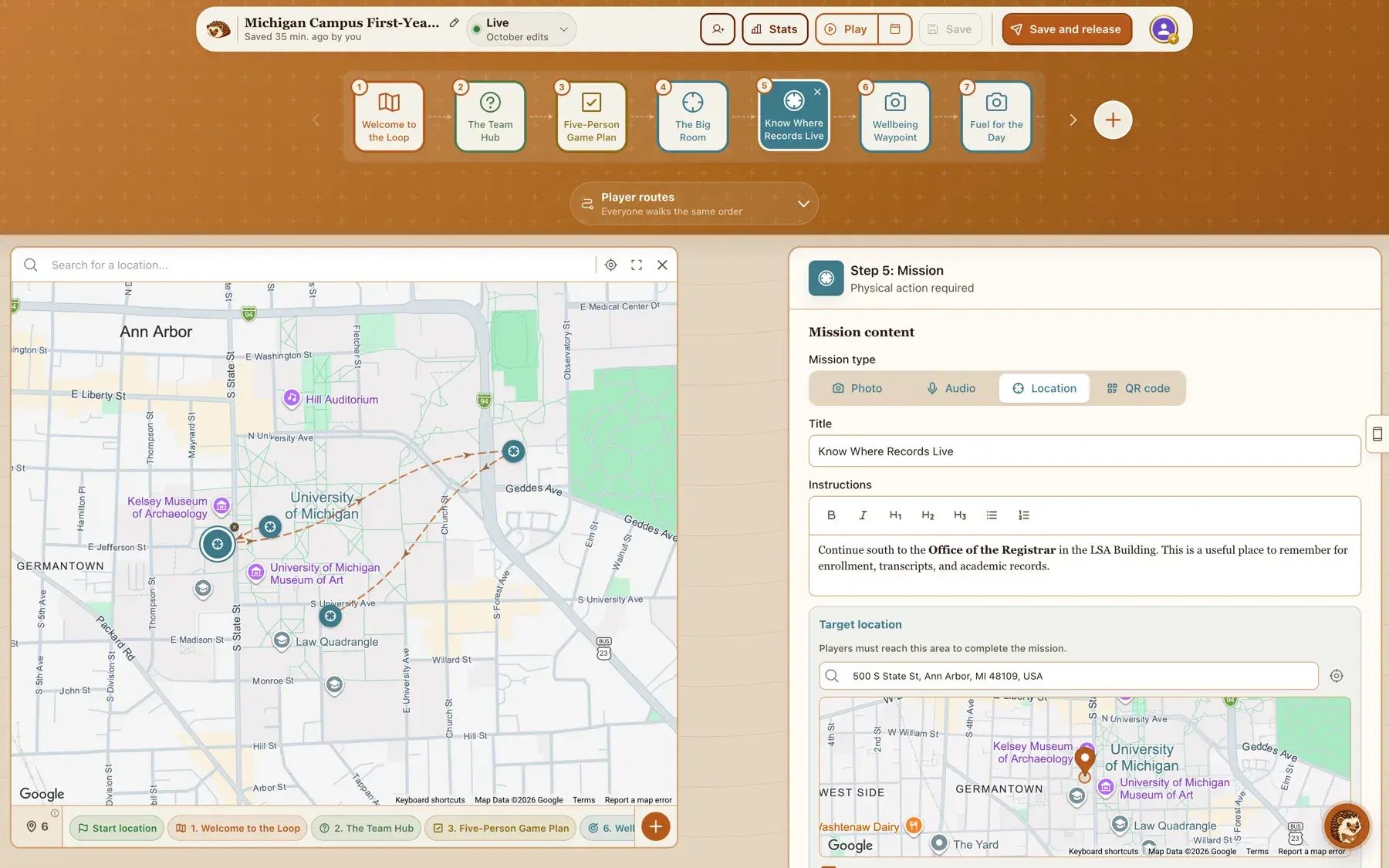
We ran this prompt once through the generator on the campus of a large US public university. It took under a minute and produced all eight stops in a sensible loop, though it leaned on location check-ins and gave us only one quiz and two photo missions, so expect to add a few questions yourself.
What you will want to change
The button below opens the builder with this prompt filled in. Sign in, and the draft takes about a minute. You can also paste it into the AI scavenger hunt generator. Either way, set your campus as the place and change the building names to the ones your campus uses. The locations in the draft are AI guesses, so check every pin on the map. Then switch the indoor stops to QR missions, turn on multiple start points, release the hunt, and set the opening time.
Draft this hunt