How it works
From an idea to a hunt people play
You describe the moment, AI drafts the hunt, and you make it yours. Players follow it through real places on their phone, with no app to install. Here is the whole flow, both sides of it.
Building a hunt
Three steps from a blank page to a hunt ready to share.
Describe the moment
Tell HedgeHunt who the hunt is for, where it happens, and the vibe you want. A sentence or two is enough. AI uses it to draft a route built around real places, with clues and challenges that fit the occasion.
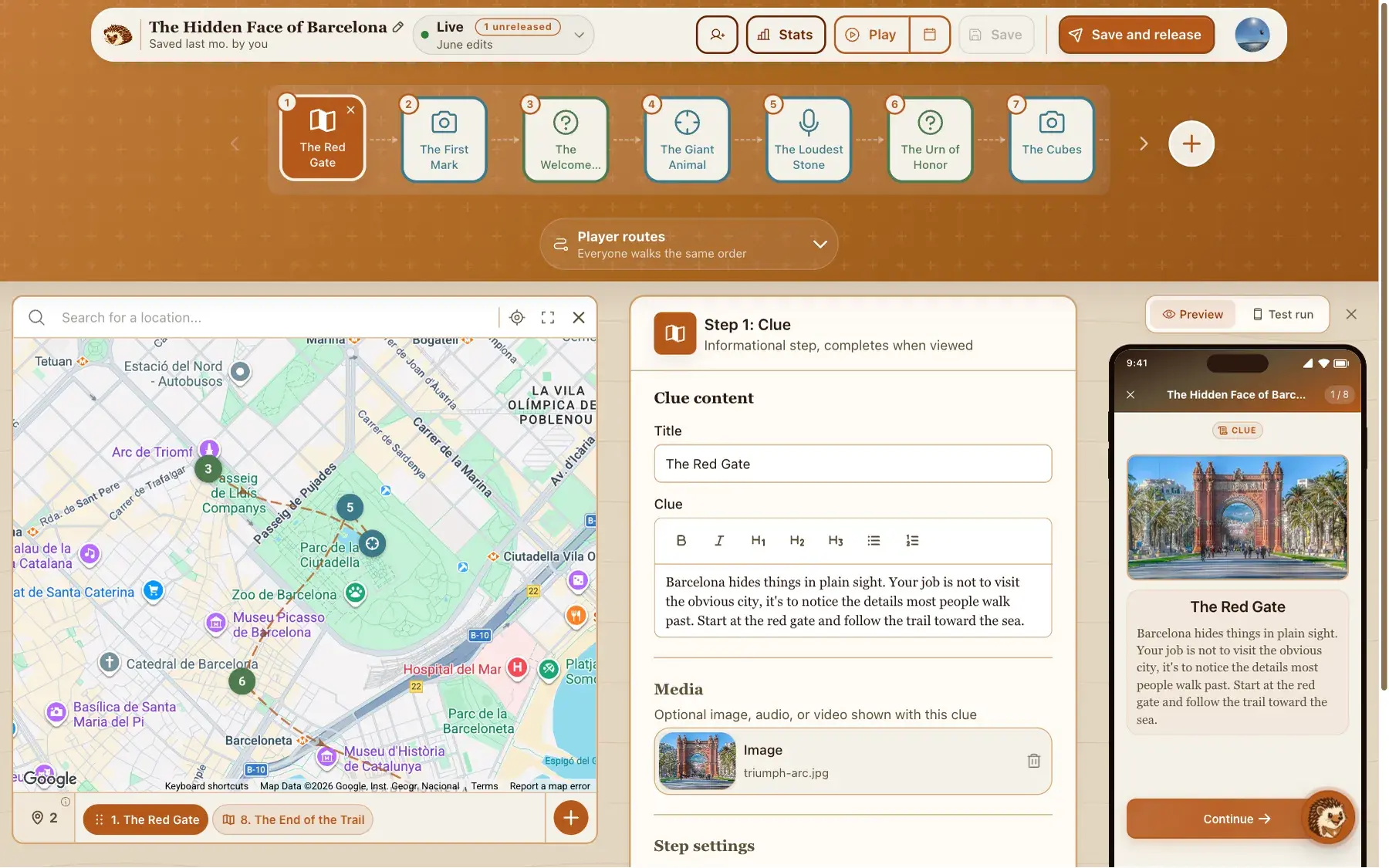
Shape it in the builder
Rewrite a clue, move a stop on the map, add a quiz or a photo mission, and set how players move through the route. Keep refining by chatting in plain language, or build every step by hand if you prefer full control.
Share a link and watch them play
Publish the hunt and share one link. Players open it in their phone browser and start. You can follow how it goes, and you can see which steps were hardest and the answers people gave.
What players experience
The other side of the link. This is what happens on a player's phone, from the first tap to the finish.
Open a link, no app
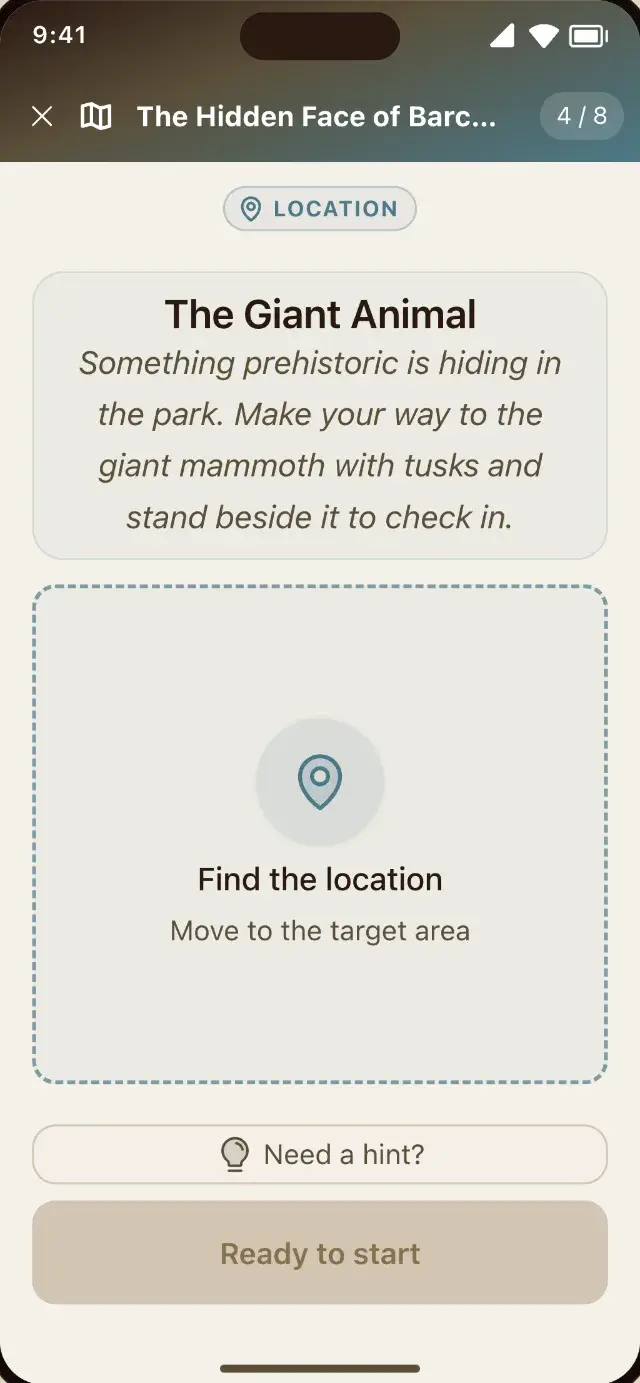
Players tap the link, see a short teaser of what awaits, and start right in the browser. Nothing to install, no account to create, no app store.
Get guided between stops
A live map points toward the next location, so players stay oriented as they move from one step to the next.
Solve real-world challenges
Each step is a clue, a quiz, a mission, or a task. Missions can ask players to reach a spot, take a photo, record audio, or scan a QR code.
Ask for a hint when stuck
Players can request a nudge on your terms, so a tricky clue never ends the game.
Learn something along the way
If you turn on discovery facts, a short "did you know" appears after a step is solved.
Finish with something to keep
The end screen shows their result on the leaderboard, the photos and audio captured during play, a shareable results card, and the option to rate the hunt.
Sharing and going live
The part most tools get confusing, in plain words. Test it on your own phone, then decide when to release. Your hunt has a private working copy and a released version, and you control when one becomes the other.
Walk it yourself first
Start a test run and scan the QR code the builder shows you. You play the hunt on your own phone, outdoors, with the same GPS gates, photo missions, timers and hints your players get. Nothing you do counts, so it never reaches your stats or your leaderboard, and the run lasts an hour. It walks your default order rather than your custom routes, and discovery facts are saved for real players.
While you build, your hunt is private
Save as often as you like. Nobody can see the hunt until you decide it is ready, so half-written clues stay between you and the builder.
Release it when it feels ready
Releasing is like printing the final copy. The exact version you released is what your link opens, and that is what players get. Want it to start at a set time? Set an opening time, and an optional closing time that stops new players while anyone already playing finishes.
Keep editing after you share the link
Changes you make after releasing stay private until you release again. Fix a typo or rework a clue while people are out playing, without breaking anything.
Pause, resume, or bring back an earlier version
Pause the hunt anytime and resume it later exactly as it was. And if an edit was a mistake, your release history lets you bring back any earlier version.
And if someone is mid-game when you release an update, they finish the version they started. Nothing changes under their feet.
A safety check before you release
Just before you go live, you can ask AI to read the whole hunt back to you. It flags steps that could put players at risk, wording that is not right for children, and anything else worth a second look, with the step number wherever it applies to one. It is optional, free, and it never blocks a release. You decide what ships.
See how the safety review works →After people have played it
Once your hunt has five play sessions, you can see which steps tripped them up and read the answers they actually gave. Ask for an analysis and AI explains what confused them on each step and names one edit to make. The counts and the quotes come from real submissions, not from the AI. This part is free too.
See how player insights works →Three jobs a location can do
Locations show up in three different places in a hunt, and they do three different things.
The meeting point
Where the hunt begins. You set it when you create the hunt, and players are pointed to it once they join, before the first step.
The walk between steps
Give a step a location and HedgeHunt guides players there with a live map. The challenge only opens once they arrive, so nobody solves the park riddle from their couch.
The location as the answer
A mission can make reaching a spot the challenge itself. Being there is how players pass the step.
The difference between the last two: one is the walk before a challenge, the other is the challenge.
Who goes where
One set of stops, three ways to send people through it.
One order for everyone
The classic hunt. Every player follows your steps in the order you set. This is how every hunt starts out.
Staggered starts
Everyone visits the same stops, but different groups start at different points along the loop. Ten teams, zero crowding at the first bench. Free.
Custom routes
Design fully different routes through the same stops, so the red team and the blue team never meet until the finish.
The dials on every step
Each step has a few optional settings. Use none of them or all of them.
Hints
Write hints that unlock one at a time, so a nudge never spoils the whole answer.
Time limit
Put a countdown on a step when you want some pressure.
Attempts
Count the tries. Running out never blocks a step; it costs points under competitive scoring.
Points
Give steps point values, so the leaderboard rewards the hard ones.
Creator note
Leave a personal message, with a photo if you like, that appears after someone completes a step. The "this is where we first met" moment.
What you can put in a hunt
Four challenge types, GPS navigation, leaderboards and scoring, discovery facts, team roles, and creator analytics. The features page covers everything you can build, and what is free and what you pay for.
Explore all features →Popular use cases
A few ways people use HedgeHunt. Each guide has tailored ideas and tips.
Ready to build your first hunt?
Start free, no card needed. Describe your idea and you can have a full draft in minutes.
Create your hunt, free